# AllTheMegas - Soul Megas & ATM Compatibility Pack
This is Soul Megas but compatible with AllTheMons, **don't** use this with Soul Megas or Mega Showdown! It features permanent megas, with models from Soul Megas!
For 1.6 there were also two versions with game accurate in-battle megas _(can still be found in the Legacy section below)_ but these have been depreciated. If you're looking for a better and more uptodate alternative, join the [MegaShowdown discord](https://discord.gg/URZnU5EKbx)!
## Dependencies _(You need these)_:
- Cobblemon **1.6.1**
- [AllTheMons **R2.2+**](https://modrinth.com/datapack/allthemons)
## How to install:
1. Make sure you **correctly** installed **all** dependencies
2. Make sure you've downloaded the **correct/latest** version of this pack
2. Add this pack to your resourcepacks `(\resourcepacks)`
3. Add this pack to your **worlds** datapack `(\saves\[YOURWORLDNAME]\datapacks)`
4. Enable the resourcepack ingame `(ESC - Options - Resource Packs)`
## How Mega Evolutions work:
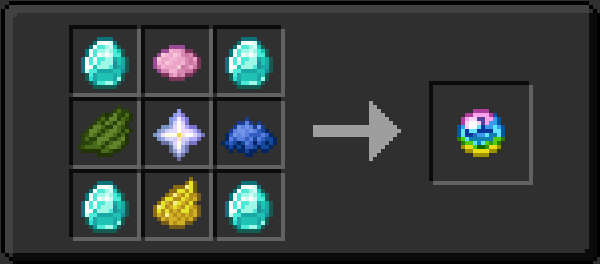
- You can Mega evolve **anytime** (outside of battle)
- Pokémon has to hold the Generic Megastone to mega evolve/deevolve (so switch it for an actual item while not using it)
- Pokémon has to be level 50+ (70+ for Pseudo & Legendaries)
- Pokémon has to have 180+ friendship with you
- NOTE that that item won't show up in JEI/REI!
## Where do added Pokémon spawn?:
### AllTheMons Pokémon
- Join their [discord](https://discord.gg/amuvCFtMVP) and type `/where <POKÉMONNAME>` in any channel
### AllTheMegas Pokémon
- **Elektrike:** _Commonly_ in plains
- **Manectric:** _Uncommonly_ in plains
- **Snover:** _Commonly_ in snowy taigas
- **Abomasnow:** _Unommonly_ in snowy taigas
- **Audino:** _Unommonly_ everywhere (especially during the day!)
## Something ain't working? - Some helpful sources:
<details>
<summary>Click me</summary>
- AllTheMegas issues? - Join the Cobblemon [discord](https://discord.com/invite/cobblemon) and click [here](https://discord.com/channels/934267676354834442/1335739332627271863)
- AllTheMons issues? - Join their [discord](https://discord.gg/amuvCFtMVP)
- Wanna configure Flourish? - Check their documentation [here](https://modrinth.com/mod/flourish-cobblemon)
- Wanna configure CobblemonMegas? Check their [documentation](https://github.com/jornadascobblemon/CobblemonMegas)
- Cobblemon issues? - Again, join their [discord](https://discord.com/invite/cobblemon) and ask around!
</details>
## FAQ:
<details>
<summary>Click me</summary>
## FAQ and some important information:
### Will this work with Cobblemon 1.6.1?
- Currently only the main version supports 1.6.1
- Legacy versions only support cobblemon 1.6.0
### Does this work on Aternos?
- Only the Standalone Version is supported
- Legacy versions never will be, due to the newest versions of Flourish and CobblemonMegas not being on Modrinth.
- Also the Aternos people won't allow you to download fabric permissions API 0.3.1 for MC 1.21.1. So don't hate me, blame them.
### What's the difference between Flourish and CobblemonMegas?
- Technically they do the same, though they have some little differences.
- Flourish has better animations, more dependencies and mega rayquaza is a lil' buggy
- CobblemonMegas has less animations, less dependencies and less issues with rayquaza
### Why doesn't mega rayquaza work?
- The way its implemented into AllTheMons(ATM) conflicts with the way flourish works.
### Why don't you fix that?
- This is basically an edited version of Soul Megas, which is meant to work with ATM. To fix mega rayquaza I'd have to edit the ATM files & thus create a whole new fork of it just for this, which I won't due to the licensing of ATM.
### Can I fix this myself?
- Yes its fairly easy if you know how to edit a datapack. You'd have to delete all rayquaza & mega rayquaza related files from ATM (`assets-animations, models, posers, resolvers, textures`;`data-spawns, species/species_additions`) and replace them with the rayquaza files from Soul Megas pack.
</details>
## Legacy Versions:
<details>
<summary>Click me</summary>
### Standalone Version (Permanent Megas)
- Cobblemon **1.6** _(Since I dropped support for newer versions)_
- [AllTheMons **2.1**](https://modrinth.com/datapack/allthemons)
- RoughlyEnoughItems/REI
### Flourish Version (In-Battle Megas, better animations)
- **Everything** from the Standalone Version
- Fabric
- Polymer **0.9.18**
- Fabric Permissions API **0.3.1** (**Not** 0.3.3 and yes it's for 1.21.1)
- Flourish **1.4.4** (**Not** 1.4.2 from Modrinth)
- Join the [cobblemon discord](https://discord.com/invite/cobblemon), click [here](https://discord.com/channels/934267676354834442/1311740597119352893/1334187731605000243), then add to `\mods`
### CobblemonMegas Version (In-Battle Megas, less dependencies, more commands)
- **Everything** from the Standalone Version
- Fabric
- Architectury API **13.0.8**
- CobblemonMegas release **1.3.5-1.6.0-1.21.1**
- Get it [here](https://github.com/jornadascobblemon/CobblemonMegas/releases/download/1.3.5-1.6.0-1.21.1/CobblemonMegas-fabric-1.3.5-1.6.0+1.21.1.jar), then add to `\mods`
## How to install:
1. Make sure you **correctly** installed **all** dependencies
2. Make sure you've downloaded the **correct** version of this pack
2. Add this pack to your resourcepacks `(\resourcepacks)`
3. Add this pack to your **worlds** datapack `(\saves\[YOURWORLDNAME]\datapacks)`
4. Enable the resourcepack ingame `(ESC - Options - Resource Packs)`
## How find all the Mega recipes:
### Flourish
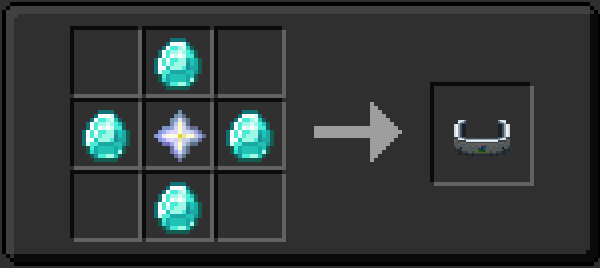
- **Mega Bracelet:**
- In REI search for `Nether Star` and `right click` or press `u`
- It'll show the recipe for the Mega Bracelet
- **Mega Stones:**
- Press `r` on the Mega Bracelet
- It'll show the recipe for all the Mega Stones
### CobblemonMegas
- **Mega Bracelet:**
- In REI search for `Nether Star` and `right click` or press `u`
- It'll show the recipe for the Mega Bracelet
- **Mega Stones:**
- In REI search for `Emerald` and `right click` or press `u`
- It'll show you recipes for all the Mega Stones
## How to mega evolve:
- They function just like in the original pokemon games,
- Only in battles
- Only one mon per battle
- Mon has to be holding their respective Mega Stone
- You have to have the Mega Bracelet
- For Flourish it has to be in your off hand (can be changed inits config, info [here](https://modrinth.com/mod/flourish-cobblemon))
- While choosing an attack in battle, you have a new button that (once clicked) will mega evolve your pokemon starting on the next turn
## Known bugs:
- **Flourish:**
- Rayquaza not mega evolving (Flourish & ATM's implementation make this impossible, so if this ever integrates into ATM, easy needs to remove his rayquaza and megarayquaza, working on a easy to implement version/branch)
</details>
## Credits!
Thanks to the amazing work of Soul and his mates, who made all the good looking mega models, which you can find [here](https://modrinth.com/datapack/soul-megas-free-megas-for-all), he allowed me to upload and share this so go show some love!
![AllTheMegas [Cobblemon]](https://cdn.modrinth.com/data/22J5gz5b/e3807cb74c39fa6f20f1d299bffe2440ff5e5639_96.webp)