Back to marketplace
Body Camera
Modrinth Shader

Body Camera

Adds a body camera effect

Minecraft product info

Important product information

Compatibility, Minecraft versions, loaders, and external source data.

Type

Shader

Access

Free

Latest version

1.6.1

Downloads

1 175 283

Loaders / Platforms

iris optifine

Minecraft versions

1.8.9 – 1.21.11 26.1 26.1.1 26.1.2 26.2

Categories

atmosphere realistic screenshot

Description

Detailed information

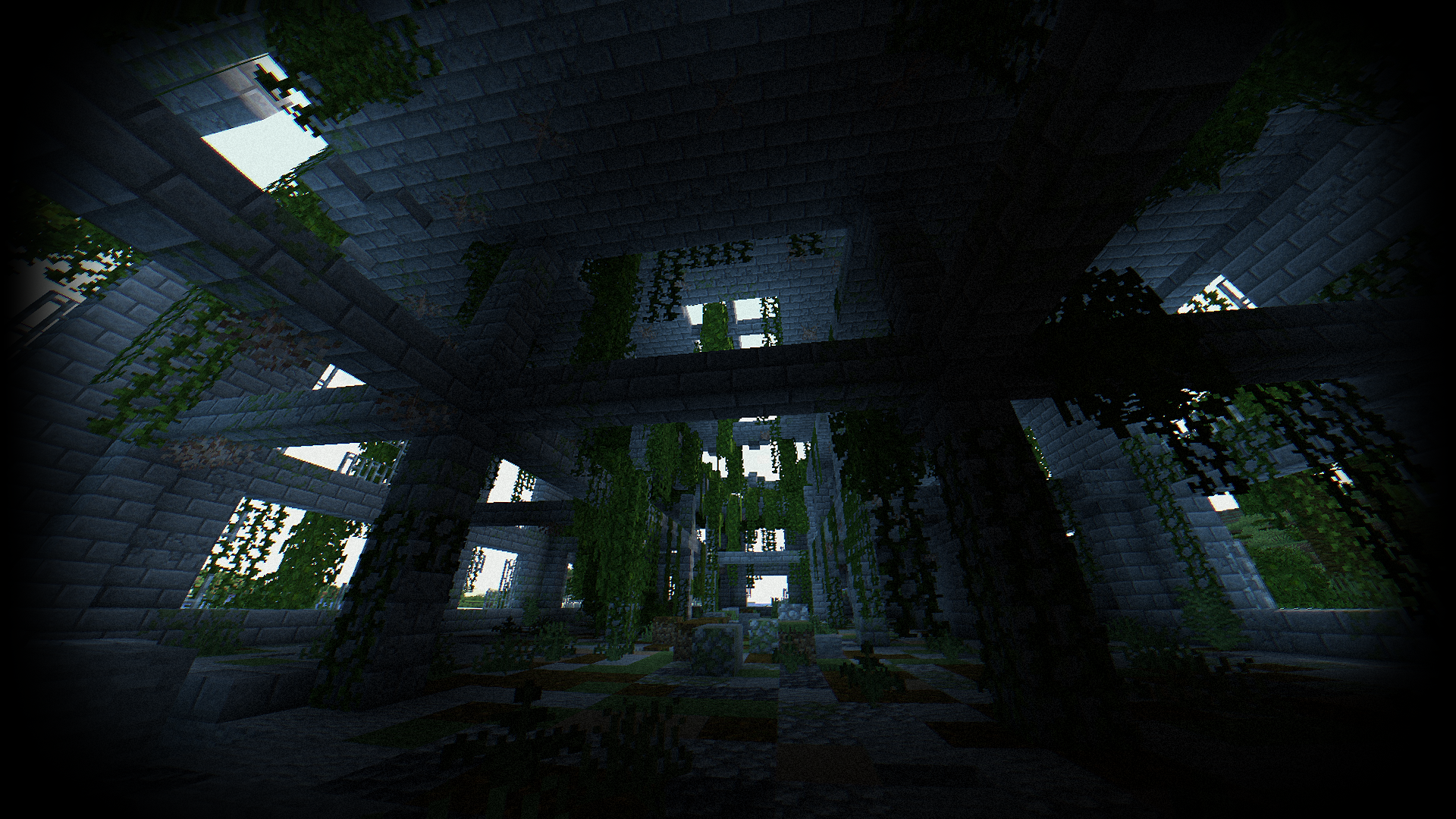
<p align="center"> <a href="https://patreon.com/cw/lolip_p"> <img src="https://img.shields.io/badge/Patreon-000000.svg?style=for-the-badge&logo=patreon&logoColor=white"> </a> <a href="https://www.patreon.com/posts/body-camera-next-153571705"> <img src="https://img.shields.io/badge/RTX_Version-735a49.svg?style=for-the-badge&logo=kedro&logoColor=white"> </a> </p> <details> <summary>EN 🌐</summary> # ABOUT: **Hi, I'm LoLip_p! This is a shader that simulates the effects of a body camera.** ### Looking for more realism? I've released a **[Next-Gen](https://www.patreon.com/posts/body-camera-next-153571705)** version of this shader! It's a complete overhaul based on Rethinking Voxels, bringing RTX lighting to the bodycam aesthetic. Check it out on my [Patreon](https://patreon.com/lolip_p)! # Base version: ### SCREENSHOT: ![Screenshot](https://cdn.modrinth.com/data/by2i3tnt/images/533f715f849702e1bd609606f17ffbf2b0dc3c58.png) ### Performance: 160 FPS+ - 2K (2560x1440) - 10 chunks - GPU: RX 580 _(8GB)_ - CPU: Ryzen 5 1500X ## THE SHADER HAS: - Fisheye Effect - Auto Exposure - Support [Better Clouds](https://modrinth.com/mod/better-clouds) - Support [Distant Horizons](https://modrinth.com/mod/distanthorizons) - PBR support _(LabPBR)_ - Chromatic Aberration - Thermal Imager - Night vision goggles - Support 3 language: _EN RU FR_ ### Recommended settings: - Brightness: 0 - Field of view (Fov): 110 ## LINKS: - [Discord](https://discord.gg/Cz2sCWz5Wh) (Discuss, Bug Reports, Etc.) - [Telegram](https://t.me/LoLip_p_Community) - [YouTube](https://www.youtube.com/@lolip_p) ## INSTALL THE SHADERS - Download Client Which Supports Installing Shaders Such As Optifine And Iris - Download The Shaders - Copy Shaders to /.minecraft/shaderpacks - Launch Minecraft, Go To Options --> Video Settings --> Shaders - Choose **Body Camera Shader** ## DEMO VIDEO <iframe width="560" height="315" src="https://www.youtube-nocookie.com/embed/kZU_4pqBNo4" title="YouTube video player" frameborder="0" allow="accelerometer; autoplay; clipboard-write; encrypted-media; gyroscope; picture-in-picture; web-share" allowfullscreen></iframe> </details> <details> <summary>RU 🐻</summary> # О: **Привет, я LoLip_p! Это шейдер, который имитирует эффекты камеры, установленной на теле.** ### Ищете больше реализма? Я выпустил **[Next-Gen](https://www.patreon.com/posts/body-camera-next-153571705)** версию этого шейдера! Это полностью переработанная версия, основанная на подходе «Rethinking Voxels», которая добавляет освещение RTX в стиле «bodycam». Посмотрите его на моем [Patreon](https://patreon.com/lolip_p)! # Базовая версия: ### СКРИНШОТ: ![Screenshot](https://cdn.modrinth.com/data/by2i3tnt/images/533f715f849702e1bd609606f17ffbf2b0dc3c58.png) ### Производительность: 160 FPS+ - 2K (2560x1440) - 10 chunks - GPU: RX 580 _(8GB)_ - CPU: Ryzen 5 1500X ## ШЕЙДЕР ИМЕЕТ: - Эффект рыбьего глаза - Авто экспозиция - Поддержка [Better Clouds](https://modrinth.com/mod/better-clouds) - Поддержка [Distant Horizons](https://modrinth.com/mod/distanthorizons) - Поддержка PBR _(LabPBR)_ - Хроматическая аберрация - Тепловизор - Очки ночного видения - Поддержка 3 языков: _EN RU FR_ ### Рекомендуемые настройки: - Яркость: 0 - Поле зрения (Fov): 110 ## ССЫЛКИ: - [Discord](https://discord.gg/Cz2sCWz5Wh) (Discuss, Bug Reports, Etc.) - [Telegram](https://t.me/LoLip_p_Community) - [YouTube](https://www.youtube.com/@lolip_p) ## УСТАНОВКА ШЕЙДЕРА - Скачать клиент, поддерживающий установку шейдеров, таких как Optifine и Iris - Скачать шейдеры - Копировать шейдеры в /.minecraft/shaderpacks - Запустите Minecraft, перейдите в «Настройки» --> Видео Настройки --> Shaders - Выбери **Body Camera Shader** ## ДЕМО-ВИДЕО <iframe width="560" height="315" src="https://www.youtube-nocookie.com/embed/kZU_4pqBNo4" title="YouTube video player" frameborder="0" allow="accelerometer; autoplay; clipboard-write; encrypted-media; gyroscope; picture-in-picture; web-share" allowfullscreen></iframe> </details> <details> <summary>CH 🐉</summary> # 关于: **你好,我是LoLip_p!这是模拟随身摄像机效果的着色器** ### 想要更逼真的效果吗? 我已经发布了这款着色器的 **[次世代](https://www.patreon.com/posts/body-camera-next-153571705)** 版本!这是基于《Rethinking Voxels》进行的一次全面重制,将 RTX 光照技术融入了随身摄像头的视觉风格。 欢迎前往我的 [Patreon](https://patreon.com/lolip_p) 查看! # Base version: ### 屏幕截图: ![Screenshot](https://cdn.modrinth.com/data/by2i3tnt/images/533f715f849702e1bd609606f17ffbf2b0dc3c58.png) ### 性能: 160 FPS+ - 2K (2560x1440) - 10 chunks - GPU: RX 580 _(8GB)_ - CPU: Ryzen 5 1500X ## 着色器具有: - 鱼眼效果 - 自动曝光 - 支持[Better Clouds](https://modrinth.com/mod/better-clouds) - 支持[Distant Horizons](https://modrinth.com/mod/distanthorizons) - PBR支持 _(LabPBR)_ - 色差 - 热成像仪 - 夜视镜 - 支持3种语言:_EN RU FR_ ### 推荐设置: - 亮度:0 - 视野(Fov):110 ## 链接: - [Discord](https://discord.gg/Cz2sCWz5Wh) (Discuss, Bug Reports, Etc.) - [Telegram](https://t.me/LoLip_p_Community) - [YouTube](https://www.youtube.com/@lolip_p) ## 安装着色器 - 下载支持安装着色器的客户端(如Optifine或Iris) - 下载着色器资源包 - 将着色器文件复制到 /.minecraft/shaderpacks 目录 - 启动Minecraft,进入选项 --> 视频设置 --> 着色器 - 选择 **Body Camera Shader** ## 演示视频 <iframe width="560" height="315" src="https://www.youtube-nocookie.com/embed/kZU_4pqBNo4" title="YouTube video player" frameborder="0" allow="accelerometer; autoplay; clipboard-write; encrypted-media; gyroscope; picture-in-picture; web-share" allowfullscreen></iframe> </details> <details> <summary>BR 🎭</summary> # SOBRE: **Olá, sou o LoLip_p! Este é um shader que simula os efeitos de uma câmera corporal.** ### Quer mais realismo? Lancei uma versão **[Next-Gen](https://www.patreon.com/posts/body-camera-next-153571705)** deste shader! Trata-se de uma reformulação completa baseada no Rethinking Voxels, que traz iluminação RTX para a estética das câmeras corporais. Confira no meu [Patreon](https://patreon.com/lolip_p)! # Base version: ### CAPTURA DE TELA: ![Screenshot](https://cdn.modrinth.com/data/by2i3tnt/images/533f715f849702e1bd609606f17ffbf2b0dc3c58.png) ### Desempenho: 160 FPS+ - 2K (2560x1440) - 10 chunks - GPU: RX 580 _(8GB)_ - CPU: Ryzen 5 1500X ## O SHADER TEM: - Efeito olho de peixe - Exposição automática - Suporte para [Better Clouds](https://modrinth.com/mod/better-clouds) - Suporte para [Distant Horizons](https://modrinth.com/mod/distanthorizons) - Suporte PBR _(LabPBR)_ - Aberração cromática - Termovisor - Óculos de visão noturna - Suporte a 3 idiomas: _EN RU FR_ ### Configurações recomendadas: - Brilho: 0 - Campo de visão (Fov): 110 ## LINKS: - [Discord](https://discord.gg/Cz2sCWz5Wh) (Discuss, Bug Reports, Etc.) - [Telegram](https://t.me/LoLip_p_Community) - [YouTube](https://www.youtube.com/@lolip_p) ## INSTALE OS SHADERS - Baixe um cliente que suporte a instalação de shaders, como Optifine e Iris - Baixe os shaders - Copie os shaders para /.minecraft/shaderpacks - Inicie o Minecraft, vá para Opções --> Configurações de vídeo --> Shaders - Escolha **Body Camera Shader** ## VÍDEO DE DEMONSTRAÇÃO <iframe width="560" height="315" src="https://www.youtube-nocookie.com/embed/kZU_4pqBNo4" title="YouTube video player" frameborder="0" allow="accelerometer; autoplay; clipboard-write; encrypted-media; gyroscope; picture-in-picture; web-share" allowfullscreen></iframe> </details> <details> <summary>DE 🍺</summary> # ÜBER: **Hallo, ich bin LoLip_p! Dies ist ein Shader, der die Effekte einer Körperkamera simuliert.** ### Lust auf noch mehr Realismus? Ich habe eine **[Next-Gen](https://www.patreon.com/posts/body-camera-next-153571705)**-Version dieses Shaders veröffentlicht! Es handelt sich um eine komplette Überarbeitung auf Basis von „Rethinking Voxels“, die RTX-Beleuchtung in die Bodycam-Ästhetik integriert. Schau sie dir auf meinem [Patreon](https://patreon.com/lolip_p) an! # Base version: ### SCREENSHOT: ![Screenshot](https://cdn.modrinth.com/data/by2i3tnt/images/533f715f849702e1bd609606f17ffbf2b0dc3c58.png) ### Leistung: 160 FPS+ - 2K (2560x1440) - 10 chunks - GPU: RX 580 _(8GB)_ - CPU: Ryzen 5 1500X ## DER SHADER VERFÜGT ÜBER: - Fisheye-Effekt - Automatische Belichtung - Unterstützung für [Better Clouds](https://modrinth.com/mod/better-clouds) - Unterstützung für [Distant Horizons](https://modrinth.com/mod/distanthorizons) - PBR-Unterstützung _(LabPBR)_ - Chromatische Aberration - Wärmebildkamera - Nachtsichtbrille - Unterstützung für 3 Sprachen: _EN RU FR_ ### Empfohlene Einstellungen: - Helligkeit: 0 - Sichtfeld (Fov): 110 ## LINKS: - [Discord](https://discord.gg/Cz2sCWz5Wh) (Discuss, Bug Reports, Etc.) - [Telegram](https://t.me/LoLip_p_Community) - [YouTube](https://www.youtube.com/@lolip_p) ## INSTALLIEREN SIE DIE SHADER - Client herunterladen, der die Installation von Shadern wie Optifine und Iris unterstützt - Shader herunterladen - Shader nach /.minecraft/shaderpacks kopieren - Minecraft starten, zu Optionen --> Videoeinstellungen --> Shader gehen - **Body Camera Shader** auswählen ## DEMO VIDEO <iframe width="560" height="315" src="https://www.youtube-nocookie.com/embed/kZU_4pqBNo4" title="YouTube video player" frameborder="0" allow="accelerometer; autoplay; clipboard-write; encrypted-media; gyroscope; picture-in-picture; web-share" allowfullscreen></iframe> </details> <details> <summary>FR 🥐</summary> # À PROPOS: **Bonjour, je suis LoLip_p ! Voici un shader qui simule les effets d'une caméra corporelle.** ### Envie d'un rendu encore plus réaliste ? J'ai publié une version **[Next-Gen](https://www.patreon.com/posts/body-camera-next-153571705)** de ce shader ! Il s'agit d'une refonte complète inspirée de « Rethinking Voxels », qui intègre l'éclairage RTX à l'esthétique des caméras corporelles. Découvrez-la sur mon [Patreon](https://patreon.com/lolip_p) ! # Base version: ### CAPTURE D'ÉCRAN: ![Screenshot](https://cdn.modrinth.com/data/by2i3tnt/images/533f715f849702e1bd609606f17ffbf2b0dc3c58.png) ### Performance: 160 FPS+ - 2K (2560x1440) - 10 chunks - GPU: RX 580 _(8GB)_ - CPU: Ryzen 5 1500X ## LE SHADER DISPOSE DE : - Effet fisheye - Exposition automatique - Prise en charge de [Better Clouds](https://modrinth.com/mod/better-clouds) - Prise en charge de [Distant Horizons](https://modrinth.com/mod/distanthorizons) - Prise en charge PBR _(LabPBR)_ - Aberration chromatique - Imageur thermique - Lunettes de vision nocturne - Prise en charge de 3 langues : _EN RU FR_ ### Paramètres recommandés : - Luminosité : 0 - Champ de vision (Fov) : 110 ## LIENS: - [Discord](https://discord.gg/Cz2sCWz5Wh) (Discuss, Bug Reports, Etc.) - [Telegram](https://t.me/LoLip_p_Community) - [YouTube](https://www.youtube.com/@lolip_p) ## INSTALLER LES SHADERS - Téléchargez un client prenant en charge l'installation de shaders tels que Optifine et Iris - Téléchargez les shaders - Copiez les shaders dans /.minecraft/shaderpacks - Lancez Minecraft, allez dans Options --> Paramètres vidéo --> Shaders - Choisissez **Body Camera Shader** ## VIDÉO DE DÉMONSTRATION <iframe width="560" height="315" src="https://www.youtube-nocookie.com/embed/kZU_4pqBNo4" title="YouTube video player" frameborder="0" allow="accelerometer; autoplay; clipboard-write; encrypted-media; gyroscope; picture-in-picture; web-share" allowfullscreen></iframe> </details>





Developer

LoLip_p

Profile and data retrieved from Modrinth

Open on Modrinth

Product gallery

Project images

Screenshots and images from the original Modrinth page.

Body Camera Shader

Image

Shadow

Auto Exposure

Thermal Imager

Night vision goggles

Support Distant Horizons

Image

Depth of Field

Support LUT

Screenshot

Change log

Project versions

Published versions and original Modrinth files.

1.6.1 Current Release 04.07.2026

Add Flashlight

Supported Minecraft versions
1.8.9 1.9 1.9.1 1.9.2 1.9.3 1.9.4 1.10 1.10.1 1.10.2 1.11 1.11.1 1.11.2 1.12 1.12.1 1.12.2 1.13 1.13.1 1.13.2 1.14 1.14.1 1.14.2 1.14.3 1.14.4 1.15 1.15.1 1.15.2 1.16 1.16.1 1.16.2 1.16.3 1.16.4 1.16.5 1.17 1.17.1 1.18 1.18.1 1.18.2 1.19 1.19.1 1.19.2 1.19.3 1.19.4 1.20 1.20.1 1.20.2 1.20.3 1.20.4 1.20.5 1.20.6 1.21 1.21.1 1.21.2 1.21.3 1.21.4 1.21.5 1.21.6 1.21.7 1.21.8 1.21.9 1.21.10 1.21.11 26.1 26.1.1 26.1.2 26.2
Loaders / Platforms
iris optifine
Show changes
In response to many requests, a flashlight has been added while a new, completely redesigned version of the shader is still in development ![fl](https://c10.patreonusercontent.com/4/patreon-media/p/post/162134396/7c9d38b248c748a4a01c5cf092441bcd/eyJhIjoxLCJ3Ijo4MjB9/1.jpg?token-hash=s7eZdNwDG1U4EFNCqKeDY7eCjjmkNgRKOu0Cw3xrtqk%3D&token-time=1784419200)
Sign in

0.47 MB

1.6.0 Release 11.04.2026

Body Camera Shader 1.6.0

Supported Minecraft versions
1.8.9 1.9 1.9.1 1.9.2 1.9.3 1.9.4 1.10 1.10.1 1.10.2 1.11 1.11.1 1.11.2 1.12 1.12.1 1.12.2 1.13 1.13.1 1.13.2 1.14 1.14.1 1.14.2 1.14.3 1.14.4 1.15 1.15.1 1.15.2 1.16 1.16.1 1.16.2 1.16.3 1.16.4 1.16.5 1.17 1.17.1 1.18 1.18.1 1.18.2 1.19 1.19.1 1.19.2 1.19.3 1.19.4 1.20 1.20.1 1.20.2 1.20.3 1.20.4 1.20.5 1.20.6 1.21 1.21.1 1.21.2 1.21.3 1.21.4 1.21.5 1.21.6 1.21.7 1.21.8 1.21.9 1.21.10 1.21.11 26.1 26.1.1 26.1.2
Loaders / Platforms
iris optifine
Show changes
**Fixed:** - Fixed blurring on weapons - For Bloom, the blur has become softer The blindness effect was also fixed when gray weather was enabled. In a previous post, Patreon wrote about the plans. Namely, add effect 4:3. Well, in this version of the shader, I succeeded. Now the fish-eye effect looks more spectacular. Of course, this setting is optional.
Sign in

0.46 MB

1.5.3 Release 01.04.2026

Vignette Improvements

Supported Minecraft versions
1.8.9 1.9 1.9.1 1.9.2 1.9.3 1.9.4 1.10 1.10.1 1.10.2 1.11 1.11.1 1.11.2 1.12 1.12.1 1.12.2 1.13 1.13.1 1.13.2 1.14 1.14.1 1.14.2 1.14.3 1.14.4 1.15 1.15.1 1.15.2 1.16 1.16.1 1.16.2 1.16.3 1.16.4 1.16.5 1.17 1.17.1 1.18 1.18.1 1.18.2 1.19 1.19.1 1.19.2 1.19.3 1.19.4 1.20 1.20.1 1.20.2 1.20.3 1.20.4 1.20.5 1.20.6 1.21 1.21.1 1.21.2 1.21.3 1.21.4 1.21.5 1.21.6 1.21.7 1.21.8 1.21.9 1.21.10 1.21.11 26.1 26.1.1
Loaders / Platforms
iris optifine
Show changes
New: - Improved the look of the vignette - Black stripes on the edges are disabled by default - Added information about Patreon
Sign in

0.46 MB

1.5.2 Release 07.01.2026

Thermal Update

Supported Minecraft versions
1.8.9 1.9 1.9.1 1.9.2 1.9.3 1.9.4 1.10 1.10.1 1.10.2 1.11 1.11.1 1.11.2 1.12 1.12.1 1.12.2 1.13 1.13.1 1.13.2 1.14 1.14.1 1.14.2 1.14.3 1.14.4 1.15 1.15.1 1.15.2 1.16 1.16.1 1.16.2 1.16.3 1.16.4 1.16.5 1.17 1.17.1 1.18 1.18.1 1.18.2 1.19 1.19.1 1.19.2 1.19.3 1.19.4 1.20 1.20.1 1.20.2 1.20.3 1.20.4 1.20.5 1.20.6 1.21 1.21.1 1.21.2 1.21.3 1.21.4 1.21.5 1.21.6 1.21.7 1.21.8 1.21.9 1.21.10 1.21.11 26.1
Loaders / Platforms
iris optifine
Show changes
Thermal Update
Sign in

0.46 MB

1.5.1 Release 26.10.2025

Fix Nether+End

Supported Minecraft versions
1.8.9 1.9 1.9.1 1.9.2 1.9.3 1.9.4 1.10 1.10.1 1.10.2 1.11 1.11.1 1.11.2 1.12 1.12.1 1.12.2 1.13 1.13.1 1.13.2 1.14 1.14.1 1.14.2 1.14.3 1.14.4 1.15 1.15.1 1.15.2 1.16 1.16.1 1.16.2 1.16.3 1.16.4 1.16.5 1.17 1.17.1 1.18 1.18.1 1.18.2 1.19 1.19.1 1.19.2 1.19.3 1.19.4 1.20 1.20.1 1.20.2 1.20.3 1.20.4 1.20.5 1.20.6 1.21 1.21.1 1.21.2 1.21.3 1.21.4 1.21.5 1.21.6 1.21.7 1.21.8 1.21.9 1.21.10 1.21.11
Loaders / Platforms
iris optifine
Sign in

0.46 MB

1.5.0 Release 31.08.2025

Bloom + Fix AO

Supported Minecraft versions
1.8.9 1.9 1.9.1 1.9.2 1.9.3 1.9.4 1.10 1.10.1 1.10.2 1.11 1.11.1 1.11.2 1.12 1.12.1 1.12.2 1.13 1.13.1 1.13.2 1.14 1.14.1 1.14.2 1.14.3 1.14.4 1.15 1.15.1 1.15.2 1.16 1.16.1 1.16.2 1.16.3 1.16.4 1.16.5 1.17 1.17.1 1.18 1.18.1 1.18.2 1.19 1.19.1 1.19.2 1.19.3 1.19.4 1.20 1.20.1 1.20.2 1.20.3 1.20.4 1.20.5 1.20.6 1.21 1.21.1 1.21.2 1.21.3 1.21.4 1.21.5 1.21.6 1.21.7 1.21.8 1.21.9 1.21.10
Loaders / Platforms
iris optifine
Show changes
- Added Bloom - The basic Auto Exposure settings have been changed - Reduced dynamic range - Fixed AO passage in ice Old: ![Old](https://cdn.modrinth.com/data/cached_images/d8fcc5eb62437d8c3451905b7647503cb6c1a19f.webp) New: ![New](https://cdn.modrinth.com/data/cached_images/bcee75a10bddced9230d6c17a606fa453fef7ec8.webp)
Sign in

0.46 MB

1.4.1 Release 05.07.2025

Fix AO & Shadow

Supported Minecraft versions
1.8.9 1.9 1.9.1 1.9.2 1.9.3 1.9.4 1.10 1.10.1 1.10.2 1.11 1.11.1 1.11.2 1.12 1.12.1 1.12.2 1.13 1.13.1 1.13.2 1.14 1.14.1 1.14.2 1.14.3 1.14.4 1.15 1.15.1 1.15.2 1.16 1.16.1 1.16.2 1.16.3 1.16.4 1.16.5 1.17 1.17.1 1.18 1.18.1 1.18.2 1.19 1.19.1 1.19.2 1.19.3 1.19.4 1.20 1.20.1 1.20.2 1.20.3 1.20.4 1.20.5 1.20.6 1.21 1.21.1 1.21.2 1.21.3 1.21.4 1.21.5 1.21.6 1.21.7 1.21.8
Loaders / Platforms
iris optifine
Show changes
### Fixed: - Fixed AO noise - Fixed the gap in the shadows.
Sign in

0.46 MB

1.4.0 Release 24.05.2025

1.4.0

Supported Minecraft versions
1.8.9 1.9 1.9.1 1.9.2 1.9.3 1.9.4 1.10 1.10.1 1.10.2 1.11 1.11.1 1.11.2 1.12 1.12.1 1.12.2 1.13 1.13.1 1.13.2 1.14 1.14.1 1.14.2 1.14.3 1.14.4 1.15 1.15.1 1.15.2 1.16 1.16.1 1.16.2 1.16.3 1.16.4 1.16.5 1.17 1.17.1 1.18 1.18.1 1.18.2 1.19 1.19.1 1.19.2 1.19.3 1.19.4 1.20 1.20.1 1.20.2 1.20.3 1.20.4 1.20.5 1.20.6 1.21 1.21.1 1.21.2 1.21.3 1.21.4 1.21.5
Loaders / Platforms
iris optifine
Show changes
### New: - Ambient Occlusion ### Fixed: - Transparency of the smoke from the campfire. - Sharp edges of lighting - The brightness of the water in the caves. - Reduced number of programs, algorithms for calculating randomness have been accelerated - Visible damage
Sign in

0.46 MB

1.3.1 Release 30.03.2025

Correction of graphics + Optimization

Supported Minecraft versions
1.8.9 1.9 1.9.1 1.9.2 1.9.3 1.9.4 1.10 1.10.1 1.10.2 1.11 1.11.1 1.11.2 1.12 1.12.1 1.12.2 1.13 1.13.1 1.13.2 1.14 1.14.1 1.14.2 1.14.3 1.14.4 1.15 1.15.1 1.15.2 1.16 1.16.1 1.16.2 1.16.3 1.16.4 1.16.5 1.17 1.17.1 1.18 1.18.1 1.18.2 1.19 1.19.1 1.19.2 1.19.3 1.19.4 1.20 1.20.1 1.20.2 1.20.3 1.20.4 1.20.5 1.20.6 1.21 1.21.1 1.21.2 1.21.3 1.21.4 1.21.5
Loaders / Platforms
iris optifine
Show changes
## New: - The light of the sun on your hand - Fog under water ## Bug fix: - Fixed rendering DH
Sign in

0.46 MB

1.3.0 Release 06.01.2025

Global update!

Supported Minecraft versions
1.8.9 1.9 1.9.1 1.9.2 1.9.3 1.9.4 1.10 1.10.1 1.10.2 1.11 1.11.1 1.11.2 1.12 1.12.1 1.12.2 1.13 1.13.1 1.13.2 1.14 1.14.1 1.14.2 1.14.3 1.14.4 1.15 1.15.1 1.15.2 1.16 1.16.1 1.16.2 1.16.3 1.16.4 1.16.5 1.17 1.17.1 1.18 1.18.1 1.18.2 1.19 1.19.1 1.19.2 1.19.3 1.19.4 1.20 1.20.1 1.20.2 1.20.3 1.20.4 1.20.5 1.20.6 1.21 1.21.1 1.21.2 1.21.3 1.21.4
Loaders / Platforms
iris optifine
Show changes
## New: - PBR support (LabPBR) ![PBR](https://cdn.modrinth.com/data/chKtnjkM/images/1ccf6b942183203ab6fecb741cea7d26ecfd12c5.jpeg) - SSR (Screen Space Reflection)![SSR](https://cdn.modrinth.com/data/chKtnjkM/images/509e587520b632a8115c9ba232c9b0bf960d1d84.jpeg) - Improved lighting support for Distant Horizons![DH Update](https://cdn.modrinth.com/data/chKtnjkM/images/819b6b515df022334f13d146a7da85797501ef4c.jpeg) - Waves on the water - Swaying foliage - Faster rendering, can add +20 FPS or more ## Bug fix: - Fixed white particles - Fixed lack of shadows in coloured glass - Fixed a noticeable shadow border in the distance - Fixed fog for clouds - Fixed rain for clouds
Sign in

0.46 MB

1.2.6 Release 24.12.2024

Optimisation + Fix bugs

Supported Minecraft versions
1.8.9 1.9 1.9.1 1.9.2 1.9.3 1.9.4 1.10 1.10.1 1.10.2 1.11 1.11.1 1.11.2 1.12 1.12.1 1.12.2 1.13 1.13.1 1.13.2 1.14 1.14.1 1.14.2 1.14.3 1.14.4 1.15 1.15.1 1.15.2 1.16 1.16.1 1.16.2 1.16.3 1.16.4 1.16.5 1.17 1.17.1 1.18 1.18.1 1.18.2 1.19 1.19.1 1.19.2 1.19.3 1.19.4 1.20 1.20.1 1.20.2 1.20.3 1.20.4 1.20.5 1.20.6 1.21 1.21.1 1.21.2 1.21.3 1.21.4
Loaders / Platforms
iris optifine
Show changes
## New: - FXAA antialiasing![FXAA](https://cdn.modrinth.com/data/chKtnjkM/images/1bb34bd81cec9fbe011f4c244312f8986f2b578d.png) - Added an item to the ‘colour correction’ tab that allows you to **disable 16 bit textures** _(may add FPS, but visual artefacts will appear)_ ## Bug fix: - The fog on Optifine did not work - Smoke artefacts![Smoke](https://cdn.modrinth.com/data/cached_images/53f5014a4fab943ca6d38da42c169e2b19e071b4.jpeg)
Sign in

0.45 MB

1.2.5 Release 10.12.2024

Support OCD Shaders

Supported Minecraft versions
1.8.9 1.9 1.9.1 1.9.2 1.9.3 1.9.4 1.10 1.10.1 1.10.2 1.11 1.11.1 1.11.2 1.12 1.12.1 1.12.2 1.13 1.13.1 1.13.2 1.14 1.14.1 1.14.2 1.14.3 1.14.4 1.15 1.15.1 1.15.2 1.16 1.16.1 1.16.2 1.16.3 1.16.4 1.16.5 1.17 1.17.1 1.18 1.18.1 1.18.2 1.19 1.19.1 1.19.2 1.19.3 1.19.4 1.20 1.20.1 1.20.2 1.20.3 1.20.4 1.20.5 1.20.6 1.21 1.21.1 1.21.2 1.21.3 1.21.4
Loaders / Platforms
iris optifine
Show changes
- Added support for [**OCD Shaders**](https://www.curseforge.com/minecraft/mc-mods/ocd-shaders-mod)
Sign in

0.45 MB

1.2.4 Release 19.10.2024

1.2.4 - HOT FIX!

Supported Minecraft versions
1.8.9 1.9 1.9.1 1.9.2 1.9.3 1.9.4 1.10 1.10.1 1.10.2 1.11 1.11.1 1.11.2 1.12 1.12.1 1.12.2 1.13 1.13.1 1.13.2 1.14 1.14.1 1.14.2 1.14.3 1.14.4 1.15 1.15.1 1.15.2 1.16 1.16.1 1.16.2 1.16.3 1.16.4 1.16.5 1.17 1.17.1 1.18 1.18.1 1.18.2 1.19 1.19.1 1.19.2 1.19.3 1.19.4 1.20 1.20.1 1.20.2 1.20.3 1.20.4 1.20.5 1.20.6 1.21 1.21.1 1.21.2 1.21.3
Loaders / Platforms
iris optifine
Show changes
## Bug fix: - Distortion colors in NETHER and END!![Distortion](https://cdn.modrinth.com/data/cached_images/c3db2582aa25cbf9c05f15d8dfc4b643b8e2841a.jpeg)
Sign in

0.45 MB

1.2.3 Release 13.10.2024

1.2.3

Supported Minecraft versions
1.8.9 1.9 1.9.1 1.9.2 1.9.3 1.9.4 1.10 1.10.1 1.10.2 1.11 1.11.1 1.11.2 1.12 1.12.1 1.12.2 1.13 1.13.1 1.13.2 1.14 1.14.1 1.14.2 1.14.3 1.14.4 1.15 1.15.1 1.15.2 1.16 1.16.1 1.16.2 1.16.3 1.16.4 1.16.5 1.17 1.17.1 1.18 1.18.1 1.18.2 1.19 1.19.1 1.19.2 1.19.3 1.19.4 1.20 1.20.1 1.20.2 1.20.3 1.20.4 1.20.5 1.20.6 1.21 1.21.1 1.21.2 1.21.3
Loaders / Platforms
iris optifine
Show changes
## New: - Add LUT support!![LUT](https://cdn.modrinth.com/data/by2i3tnt/images/dd144ebda0b3c4894015df4fefce9c87df010828.jpeg) - Add NVG activation when sneaking!
Sign in

0.45 MB

1.2.2 Release 04.10.2024

1.2.2

Supported Minecraft versions
1.8.9 1.9 1.9.1 1.9.2 1.9.3 1.9.4 1.10 1.10.1 1.10.2 1.11 1.11.1 1.11.2 1.12 1.12.1 1.12.2 1.13 1.13.1 1.13.2 1.14 1.14.1 1.14.2 1.14.3 1.14.4 1.15 1.15.1 1.15.2 1.16 1.16.1 1.16.2 1.16.3 1.16.4 1.16.5 1.17 1.17.1 1.18 1.18.1 1.18.2 1.19 1.19.1 1.19.2 1.19.3 1.19.4 1.20 1.20.1 1.20.2 1.20.3 1.20.4 1.20.5 1.20.6 1.21 1.21.1 1.21.2 1.21.3
Loaders / Platforms
iris optifine
Show changes
## New: - Add Fog! ![Fog](https://cdn.modrinth.com/data/cached_images/9cac1987b72de13a3ee3bd6a9d1d807f33125eb1.jpeg) - Add new Profile! _(Grey weather)_ ![Grey weather](https://cdn.modrinth.com/data/cached_images/4cecfa4f286de486be088bceb552384bfb4e08a8.jpeg) ## Bug fix: - Fixed shadow range - Fixed color overflow
Sign in

0.05 MB

1.2.1 Release 31.07.2024

1.2.1

Supported Minecraft versions
1.8.9 1.9 1.9.1 1.9.2 1.9.3 1.9.4 1.10 1.10.1 1.10.2 1.11 1.11.1 1.11.2 1.12 1.12.1 1.12.2 1.13 1.13.1 1.13.2 1.14 1.14.1 1.14.2 1.14.3 1.14.4 1.15 1.15.1 1.15.2 1.16 1.16.1 1.16.2 1.16.3 1.16.4 1.16.5 1.17 1.17.1 1.18 1.18.1 1.18.2 1.19 1.19.1 1.19.2 1.19.3 1.19.4 1.20 1.20.1 1.20.2 1.20.3 1.20.4 1.20.5 1.20.6 1.21 1.21.1
Loaders / Platforms
iris optifine
Show changes
You can also try to download a ready-made [**modpack**](https://modrinth.com/modpack/body-camera-modpack). This mod pack adds realistic camera, weapons and sounds! There is also a server available where you can play with other players! **Server IP:** bodycam.20tps.ru ## New: - Add support mod [Better Clouds](https://modrinth.com/mod/better-clouds) - Add Stars on Sky
Sign in

0.05 MB

1.2.0 Release 23.07.2024

1.2.0

Supported Minecraft versions
1.8.9 1.9 1.9.1 1.9.2 1.9.3 1.9.4 1.10 1.10.1 1.10.2 1.11 1.11.1 1.11.2 1.12 1.12.1 1.12.2 1.13 1.13.1 1.13.2 1.14 1.14.1 1.14.2 1.14.3 1.14.4 1.15 1.15.1 1.15.2 1.16 1.16.1 1.16.2 1.16.3 1.16.4 1.16.5 1.17 1.17.1 1.18 1.18.1 1.18.2 1.19 1.19.1 1.19.2 1.19.3 1.19.4 1.20 1.20.1 1.20.2 1.20.3 1.20.4 1.20.5 1.20.6 1.21
Loaders / Platforms
iris optifine
Show changes
## New: - Add Shadow![Shadow](https://cdn.modrinth.com/data/by2i3tnt/images/f77b52ef8d147216c38e6c9fe94dca37e9b6ea69.png) - Night vision goggles![Night vision goggles](https://cdn.modrinth.com/data/by2i3tnt/images/7396e8fd5414409efd3e942cdcb3926077b2ab9c.png) - Thermal Imager![Thermal Imager](https://cdn.modrinth.com/data/by2i3tnt/images/b1b5f825fded005c9b0e54eed05f77ba06b69bad.png) - Add language: French
Sign in

0.05 MB

1.1.0 Release 16.07.2024

1.1.0

Supported Minecraft versions
1.8.9 1.9 1.9.1 1.9.2 1.9.3 1.9.4 1.10 1.10.1 1.10.2 1.11 1.11.1 1.11.2 1.12 1.12.1 1.12.2 1.13 1.13.1 1.13.2 1.14 1.14.1 1.14.2 1.14.3 1.14.4 1.15 1.15.1 1.15.2 1.16 1.16.1 1.16.2 1.16.3 1.16.4 1.16.5 1.17 1.17.1 1.18 1.18.1 1.18.2 1.19 1.19.1 1.19.2 1.19.3 1.19.4 1.20 1.20.1 1.20.2 1.20.3 1.20.4 1.20.5 1.20.6 1.21
Loaders / Platforms
iris optifine
Show changes
## New: - VHS effect - Support Distant Horizons![Support Distant Horizons](https://cdn.modrinth.com/data/by2i3tnt/images/8d7c88b5237244ab11d4595d51473c5d442f73ee.png)
Sign in

0.01 MB

1.0.1 Release 01.07.2024

1.0.1

Supported Minecraft versions
1.8.9 1.9 1.9.1 1.9.2 1.9.3 1.9.4 1.10 1.10.1 1.10.2 1.11 1.11.1 1.11.2 1.12 1.12.1 1.12.2 1.13 1.13.1 1.13.2 1.14 1.14.1 1.14.2 1.14.3 1.14.4 1.15 1.15.1 1.15.2 1.16 1.16.1 1.16.2 1.16.3 1.16.4 1.16.5 1.17 1.17.1 1.18 1.18.1 1.18.2 1.19 1.19.1 1.19.2 1.19.3 1.19.4 1.20 1.20.1 1.20.2 1.20.3 1.20.4 1.20.5 1.20.6 1.21
Loaders / Platforms
iris optifine
Show changes
### Bug fix: - Fixed fog when disabled.
Sign in

0.01 MB

1.0.0 Release 29.06.2024

1.0.0

Supported Minecraft versions
1.8.9 1.9 1.9.1 1.9.2 1.9.3 1.9.4 1.10 1.10.1 1.10.2 1.11 1.11.1 1.11.2 1.12 1.12.1 1.12.2 1.13 1.13.1 1.13.2 1.14 1.14.1 1.14.2 1.14.3 1.14.4 1.15 1.15.1 1.15.2 1.16 1.16.1 1.16.2 1.16.3 1.16.4 1.16.5 1.17 1.17.1 1.18 1.18.1 1.18.2 1.19 1.19.1 1.19.2 1.19.3 1.19.4 1.20 1.20.1 1.20.2 1.20.3 1.20.4 1.20.5 1.20.6 1.21
Loaders / Platforms
iris optifine
Show changes
**Release**
Sign in

0.01 MB